Robotics Tournament Management System
A comprehensive web-based platform for organizing, managing, and tracking robotics competitions with real-time scoring, team management, and tournament brackets.
Here is a technical portfolio for the RMS Backend project, based on the provided files.
Project Technical Portfolio: RMS Backend
1. Project Overview
The RMS (Robotics Management System) Backend is a comprehensive, NestJS-based application designed to manage robotics tournaments. It provides a complete solution for the tournament lifecycle, featuring user management with role-based access, automated match scheduling (including Swiss and Playoff stages), multi-field support, and real-time scoring via WebSockets.
The system is built with a modern technology stack, centered around Node.js, NestJS, and Prisma, and is designed for scalability and maintainability.
2. Core Features
- User Management: Role-based access control (RBAC) with 6 distinct user roles (e.g.,
ADMIN,HEAD_REFEREE,TEAM_LEADER). - Tournament Management: Full CRUD operations for tournaments, including configuration of stages, teams, and scoring.
- Match Scheduling: Automated scheduling with support for multiple strategies, including Swiss, Playoff, and Final stages.
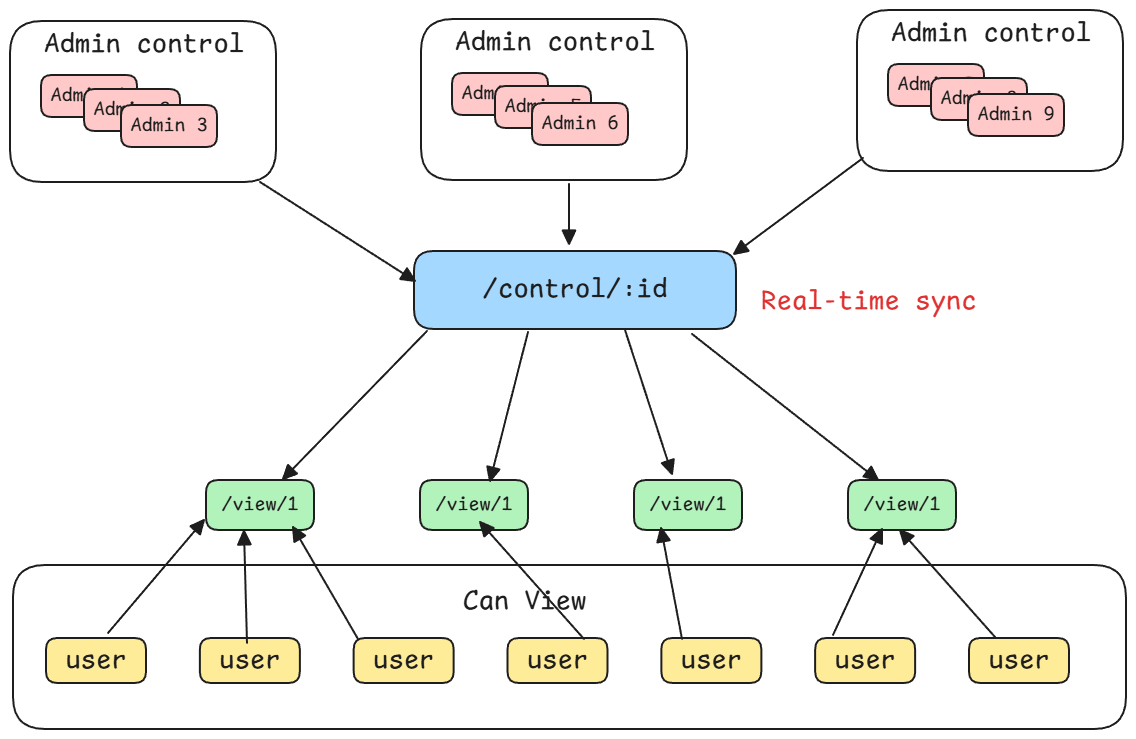
- Real-time Scoring: Live score updates broadcast to connected clients (like field displays) using Socket.IO.
- Multi-field Support: Ability to manage and assign matches and referees to multiple concurrent fields within a tournament.
- Dynamic Score Configuration: A flexible system allowing tournament admins to define scoring elements, bonus conditions, and penalties.
- Email Notifications: Integrated email service for functions like user account activation.
3. Technology Stack
| Category | Technology | Source(s) |
|---|---|---|
| Framework | NestJS 11.0.1 | |
| Language | TypeScript | |
| Runtime | Node.js 18+ | |
| Database | PostgreSQL 12+ | |
| ORM | Prisma 6.6.0 | |
| Authentication | JWT with HTTP-only cookies, Passport, bcrypt | |
| Real-time | Socket.IO (via @nestjs/websockets) | |
| API & Docs | REST, Swagger (OpenAPI) | |
| Validation | Zod (via nestjs-zod), class-validator | |
| Emailing | Nodemailer (via @nestjs-modules/mailer) | |
| Deployment | Docker, PM2 |
4. System Architecture
The application is built on a modular, service-oriented architecture using NestJS. The AppModule imports various feature modules, each encapsulating a specific domain of the application. This promotes separation of concerns and maintainability.
Core Modules:
AuthModule: Handles user registration, login, and JWT-based session management.UsersModule: Manages user profiles and roles.TournamentsModule: Manages the core tournament lifecycle.TeamsModule: Manages team registration and details.StagesModule: Manages tournament stages (e.g., Swiss, Playoff).MatchesModule: Manages individual matches, scheduling, and status.MatchSchedulerModule: Contains the logic for automated match generation.ScoreConfigModule: Manages the dynamic scoring rules for a tournament.MatchScoresModule: Handles the submission and calculation of scores for matches.EventsGateway(WebSocket): A central provider for real-time communication, broadcasting updates like score changes and match state transitions.PrismaService: A shared provider that encapsulates the Prisma Client, injected into other services for database access.
Module Dependency Diagram
graph TD
    subgraph Core
        AppModule[AppModule]
        PrismaService(PrismaService)
        EventsGateway(EventsGateway)
    end

    subgraph Features
        AuthModule(AuthModule)
        UsersModule(UsersModule)
        TournamentsModule(TournamentsModule)
        TeamsModule(TeamsModule)
        StagesModule(StagesModule)
        MatchesModule(MatchesModule)
        MatchSchedulerModule(MatchSchedulerModule)
        MatchScoresModule(MatchScoresModule)
        TeamStatsApiModule(TeamStatsApiModule)
        ScoreConfigModule(ScoreConfigModule)
        FieldRefereesModule(FieldRefereesModule)
        EmailsModule(EmailsModule)
    end

    AppModule --> AuthModule
    AppModule --> UsersModule
    AppModule --> TournamentsModule
    AppModule --> TeamsModule
    AppModule --> StagesModule
    AppModule --> MatchesModule
    AppModule --> MatchSchedulerModule
    AppModule --> MatchScoresModule
    AppModule --> TeamStatsApiModule
    AppModule --> ScoreConfigModule
    AppModule --> FieldRefereesModule
    AppModule --> EmailsModule
    AppModule --> EventsGateway
    AppModule --> PrismaService

    AuthModule --> UsersModule
    AuthModule --> EmailsModule
    UsersModule -.-> PrismaService
    TournamentsModule -.-> PrismaService
    TeamsModule -.-> PrismaService
    StagesModule -.-> PrismaService
    MatchesModule -.-> PrismaService
    MatchScoresModule -.-> PrismaService
    ScoreConfigModule -.-> PrismaService

    EventsGateway -.-> MatchScoresModule
    EventsGateway -.-> MatchesModule

    style Core fill:#f9f,stroke:#333,stroke-width:2px
    style Features fill:#ccf,stroke:#333,stroke-width:2px
5. Database & Data Model
The data model is managed by Prisma and defined in the prisma/schema.prisma file. The schema is centered around the Tournament model, which acts as a root for most other data, including Stages, Teams, Fields, and ScoreConfigs.
Key Model ERD
This diagram illustrates the core relationships between the main entities in the system.
erDiagram
    User {
        String id PK
        String username
        String password
        UserRole role
        String email
    }

    Tournament {
        String id PK
        String name
        DateTime startDate
        DateTime endDate
        String adminId FK
    }

    Stage {
        String id PK
        String name
        StageType type
        String tournamentId FK
    }

    Team {
        String id PK
        String teamNumber
        String name
        String tournamentId FK
        String currentStageId FK
    }

    Match {
        String id PK
        Int matchNumber
        MatchState status
        String stageId FK
        String fieldId FK
    }

    Alliance {
        String id PK
        AllianceColor color
        Int score
        String matchId FK
    }

    TeamAlliance {
        String id PK
        String teamId FK
        String allianceId FK
    }

    ScoreConfig {
        String id PK
        String name
        String tournamentId FK
    }

    ScoreElement {
        String id PK
        String name
        String code
        Int pointsPerUnit
        String scoreConfigId FK
    }

    MatchScore {
        String id PK
        Int units
        Int totalPoints
        String matchId FK
        String allianceId FK
        String scoreElementId FK
    }

    Field {
        String id PK
        String name
        Int number
        String tournamentId FK
    }

    User ||--o{ Tournament : "manages"
    User ||--o{ FieldReferee : "is_a"
    Tournament ||--o{ Stage : "has"
    Tournament ||--o{ Team : "has"
    Tournament ||--o{ Field : "has"
    Tournament ||--o{ ScoreConfig : "defines"
    Tournament ||--o{ TeamStats : "tracks"
    Stage ||--o{ Match : "contains"
    Stage }o--o{ Team : "advances"
    Team ||--o{ TeamStats : "has"
    Team ||--o{ TeamMember : "has"
    Match ||--o{ Alliance : "has"
    Match }o--o{ Field : "on"
    Match ||--o{ MatchScore : "generates"
    Alliance ||--o{ TeamAlliance : "links"
    Team ||--o{ TeamAlliance : "links"
    Alliance ||--o{ MatchScore : "has_scores"
    ScoreConfig ||--o{ ScoreElement : "composed_of"
    ScoreConfig ||--o{ BonusCondition : "defines"
    ScoreConfig ||--o{ PenaltyCondition : "defines"
    ScoreElement ||--o{ MatchScore : "tracked_by"
    Field ||--o{ FieldReferee : "assigned_to"
Key Model Descriptions
- User: Represents an individual who can log in. Has a
role(e.g.,ADMIN,HEAD_REFEREE) that determines permissions. - Tournament: The top-level entity for an event. It has a start/end date and is associated with an
ADMINuser. It containsStages,Teams,Fields, andScoreConfigs. - Stage: A phase of a tournament, such as
SWISSorPLAYOFF. It contains a set ofMatches. - Team: A participant in a
Tournament. Can haveTeamMembers and progresses throughStages. - Match: An individual game between
Alliances. It has astatus(e.g.,PENDING,IN_PROGRESS,COMPLETED) and is scheduled at a specific time on aField. - Alliance: One of the two sides (
REDorBLUE) in aMatch. It is composed of one or more teams (viaTeamAlliance). - ScoreConfig: Defines the scoring rules for a tournament. It is composed of
ScoreElements (e.g., “Cubes in Goal”, 5 points),BonusConditions, andPenaltyConditions. - MatchScore: A record of a specific
ScoreElementfor a specificAlliancein a specificMatch. - Field: A physical location where matches are played.
FieldReferees can be assigned to it. - FieldDisplay: Represents the screen associated with a
Field, showing thecurrentMatchorCUSTOM_MESSAGE.
6. API & Real-Time Communication
Key API Endpoints
- Authentication:
POST /api/auth/register,POST /api/auth/login - Core Resources: Full CRUD on
/api/users,/api/tournaments,/api/teams,/api/stages,/api/matches - Team Import:
POST /api/teams/import - Stage Advancement:
POST /api/stages/:id/advance-teams - Scheduling:
POST /api/match-scheduler/generate,GET /api/match-scheduler/schedule/:stageId - Scoring & Rankings:
GET /api/match-scores/leaderboard - Referee Assignment:
POST /api/field-referees/assign
WebSocket Events
The EventsGateway handles real-time communication.
- Client Emits:
join-field-display: A client (e.g., a field monitor) joins a room to receive updates for a specific field.update-score: A referee client sends a partial score update.persist-scores: A referee client submits the final scores for a match.
- Server Emits:
score-update: Broadcasts updated (non-final) scores to all clients viewing a match.match-state-change: Informs clients about changes in a match’s status (e.g.,IN_PROGRESStoCOMPLETED).field-display-update: Sends comprehensive state updates to field display clients.
7. Development & Operations
- Development: The
npm run start:devscript uses Webpack HMR for a hot-reload development experience. - Testing: The project includes scripts for unit tests (
npm run test), e2e tests (npm run test:e2e), and test coverage (npm run test:cov). - Database Migrations: Database schema changes are managed by Prisma Migrate (
npx prisma migrate dev). - Deployment: The application is designed for production deployment using either Docker (via
docker-compose) or a process manager like PM2. - Admin Initialization: On application startup, the
AppModuleensures a default admin account exists by callingauthService.createDefaultAdmin().